
Human-in-the-loop, Crafted by Intelligence. > A professional AI workflow tool designed for long-form, deep content creation. Rejecting the mediocrity of “one-click generation,” it uses a professional pipeline of Material Parsing -> Outline Building -> Sectional Writing to let AI truly become your creative partner.
🔗 Start Now (Google Account Required): Ink & Craft on AI Studio

Core Philosophy
When generating deep articles over 5,000 words (such as industry analysis, interview transcripts, or long-form features), asking AI to “write an article” directly often leads to logical gaps, hallucinations, or bland styles.
Many AI tools are poorly designed—not targeting anyone specific, but most are garbage—completely failing to fit real workflows. Thus, I was forced to build my own.
Ink & Craft adopts a Human-in-the-loop mode:
- Deep Listening: Not just transcribing audio, but understanding context and distinguishing speakers.
- Deep Thinking: Utilizing Gemini 3 Pro’s Thinking Mode to conceptualize before writing.
- Steady Writing: Ensuring rigorous logic and eliminating hallucinations through “Director’s Annotation” and “Sectional Generation”.
🚀 Quick Start Guide
Step 1: Material Production
(Note: This step is optional. If you already have an idea, thought, outline, or document, you can skip to Step 2 and upload it there.)
Scenario: You have a meeting recording, expert interview, or chaotic voice memos.
- Upload File: Supports MP3, WAV, M4A, MP4.
- AI Transcription & Diarization:
- The system automatically performs Diarization, distinguishing who is speaking.
- Streaming Output: Watch text generate in real-time like Matrix code.
- Sync Editing:
- Click any text segment to jump the audio to that timestamp.
- Found an error? Edit the text box directly.
- Smart Review:
- Click “Start Review”, and AI scans the text, highlighting potential homophone errors or logical contradictions in red.
- Export: Generate structured JSON data (with timestamps) for the next steps.
Step 2: Outline Builder
Scenario: You need to define the skeleton and soul of the article.
- Reference Material:
- System automatically reads the transcript from Step 1 (Optional).
- You can also upload PDF, Word, or images as supplements. AI analyzes all your uploaded documents/ideas even without a transcript.
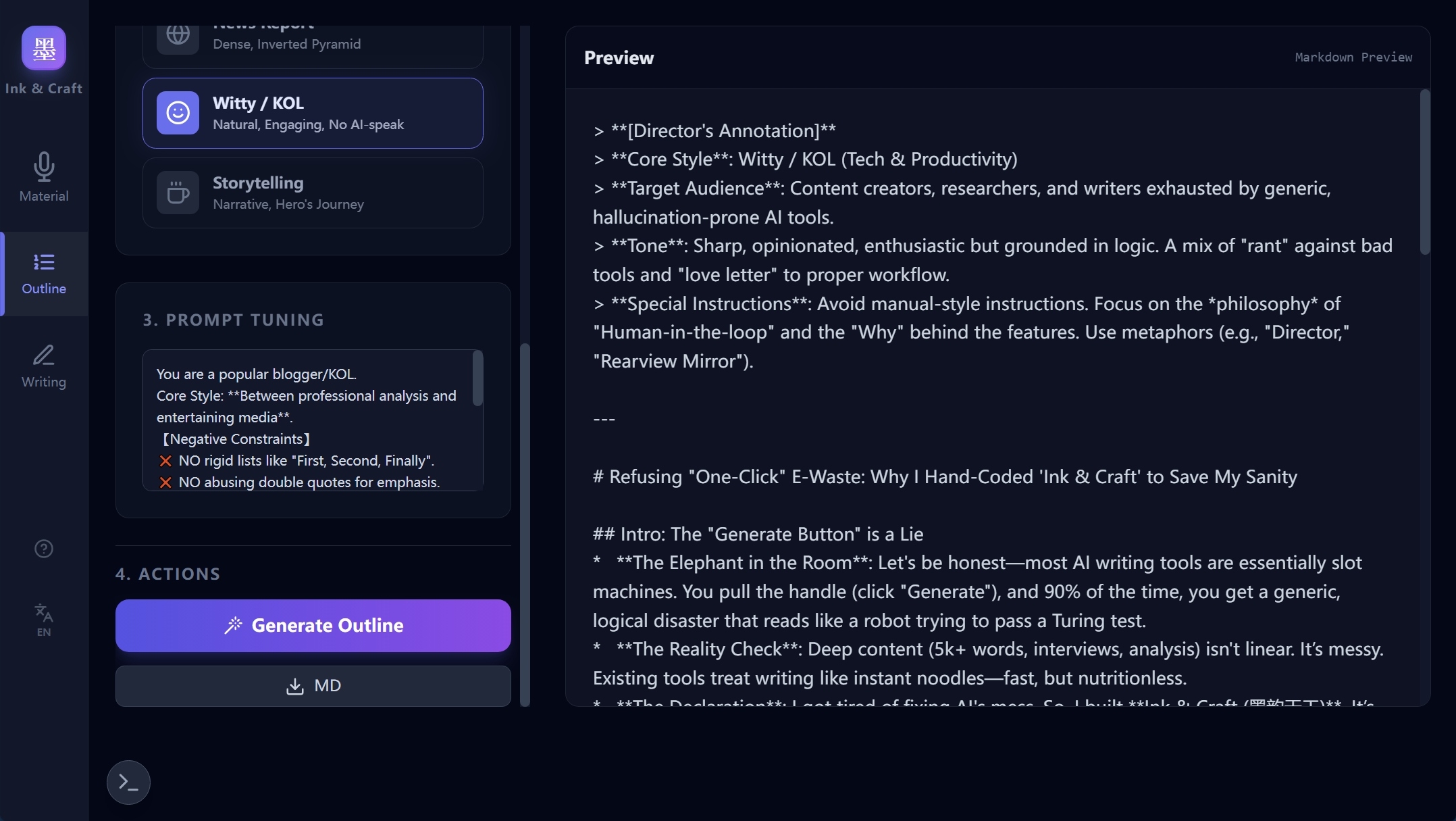
- Define Style & Tone:
- Professional: Rigorous logic, suitable for research reports.
- Interview Note: Structured Q&A, removing filler words, retaining original meaning.
- News Report: Inverted pyramid structure, information-dense.
- Witty / KOL: Rejecting AI-speak, explaining professional logic like a seasoned blogger using “human language”.
- Storytelling: Hero’s Journey structure, suitable for feature stories.
- Prompt Tuning: Modify the AI’s System Prompt to inject your unique requirements.
- Generate Outline:
- AI generates a Markdown outline containing a [Director’s Annotation].
- This guide contains metadata like core style and target audience, serving as the “genes” for the next writing step.
Step 3: Article Writing
Scenario: Fleshing out the skeleton into a full-bodied long-form article.
- Configuration:
- Split Granularity: Choose to split by H1 (coarse) or H2/H3 (fine). Coarse granularity is recommended for long texts to ensure continuity.
- Global Instructions: Input extra requirements for the entire article.
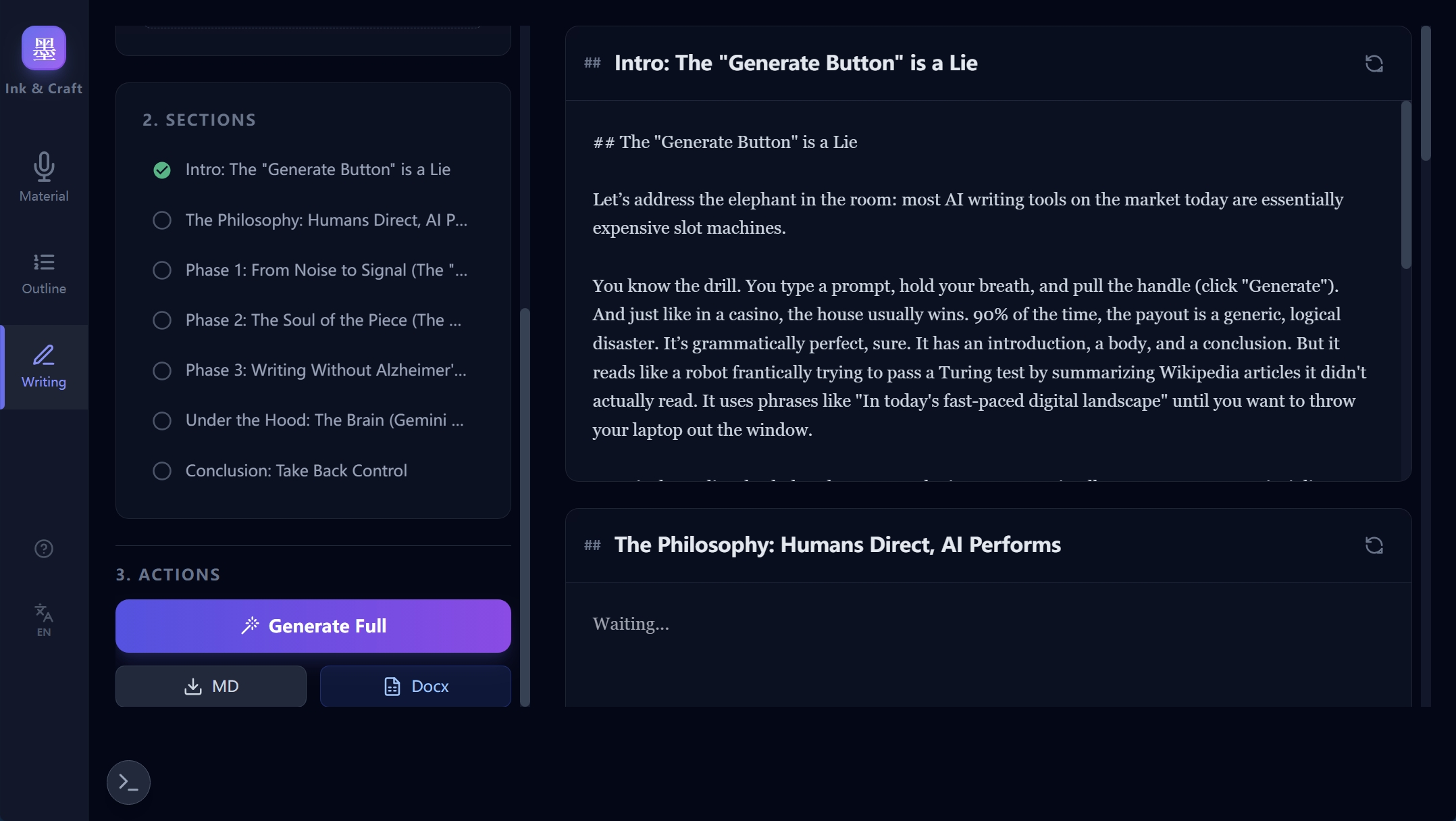
- Sectional Closed-Loop Generation:
- Click the chapter list on the left to generate one by one, or click “Generate Full”.
- Anti-Hallucination Mechanism: When generating each chapter, AI looks at the complete material and style guide through a “rearview mirror,” ensuring it stays on topic and doesn’t fabricate facts.
- Refinement:
- Not satisfied with a section? Click the “Refresh” icon on that chapter.
- Tell AI: “This tone is too stiff, add a vivid example,” and it will rewrite that paragraph precisely.
- Full Format Export:
- Supports Markdown export.
- Supports Word (.docx) export, perfectly preserving heading levels and formatting, ready for publishing.
💡 Advanced Tips
1. Director’s Annotation Mode
When generating the outline in Step 2, AI creates metadata at the top of the document like this:
[Director's Annotation]
Core Style: Witty / KOL
Tone Requirements: No "First/Second", use metaphorsTip: You can manually edit this metadata before starting Step 3! The subsequent AI writing will strictly follow your modified instructions.
2. Deep Thinking (Thinking Mode)
We integrated Google’s latest Gemini 3 Pro model with Thinking Config enabled.
- When generating outlines or complex chapters, you will see a “Thinking…” status.
- This means AI is performing logical deduction in the background, significantly reducing logical loopholes.
3. Global Debug Console
Click the terminal icon (>_) at the bottom left to see every Prompt sent to AI and the raw AI Response. This is an excellent debugging tool for Prompt Engineering enthusiasts.
FAQ
- Q: How long of a recording is supported?
- A: Theoretically supports hours of recording. Gemini has a massive Context Window and can “read” the entire interview at once.
- Q: Will progress be lost if the page refreshes?
- A: No. Progress in all modules is automatically saved in your local browser (LocalStorage).
- Q: Why does the generated article sometimes repeat itself?
- A: Try adjusting “Split Granularity” to “By H1”. Too fine a granularity causes AI to lack context perception, leading to repetition.
Welcome to use: https://ai.studio/apps/drive/1gU3x_J_iP1xjbZnn3MDXNa87YRv849aq
Feedback: zxwork7@gmail.com
Copyright © 2025 Ink & Craft. Powered by 看海的狐狸
 看海的狐狸的后花园